
What Is a Machine Readable Zone (MRZ) — And Why It Matters for Identity Verification
Every time someone crosses a border, checks into a flight, opens a bank account, or verifies their identity online, there is a small strip of text doing a significant amount of work behind the scenes. It sits quietly at the bottom of passports, ID cards, and travel documents the world over. It looks like a line of scrambled characters — and yet it carries everything a system needs to verify who someone is in a matter of milliseconds.
This is the Machine Readable Zone, or MRZ. And understanding how it works is key to understanding modern identity verification.
What Is a Machine Readable Zone?
A Machine Readable Zone is a standardised section found at the bottom of identity documents — most commonly on the photo page of a passport or the reverse side of an ID card. It contains the document holder’s core personal data encoded in a format that machines can read instantly using optical character recognition (OCR) technology.
The information encoded in the MRZ typically includes the document type, the issuing country, the document number, the holder’s full name, date of birth, nationality, gender, and the document’s expiry date. It also includes check digits — a mathematical verification mechanism that allows systems to detect whether any part of the MRZ has been tampered with or forged.
The MRZ is not new technology. The International Civil Aviation Organization (ICAO) began its work on machine-readable travel documents in 1968, with the aim of speeding up passenger clearance at border control. The first specifications for machine-readable passports were published in 1980, and the technology was quickly adopted globally. By 2015, the ICAO had phased out all non-machine-readable passports among its 193 member states. Today, every internationally accepted travel document uses MRZ.
What Does the MRZ Actually Look Like?
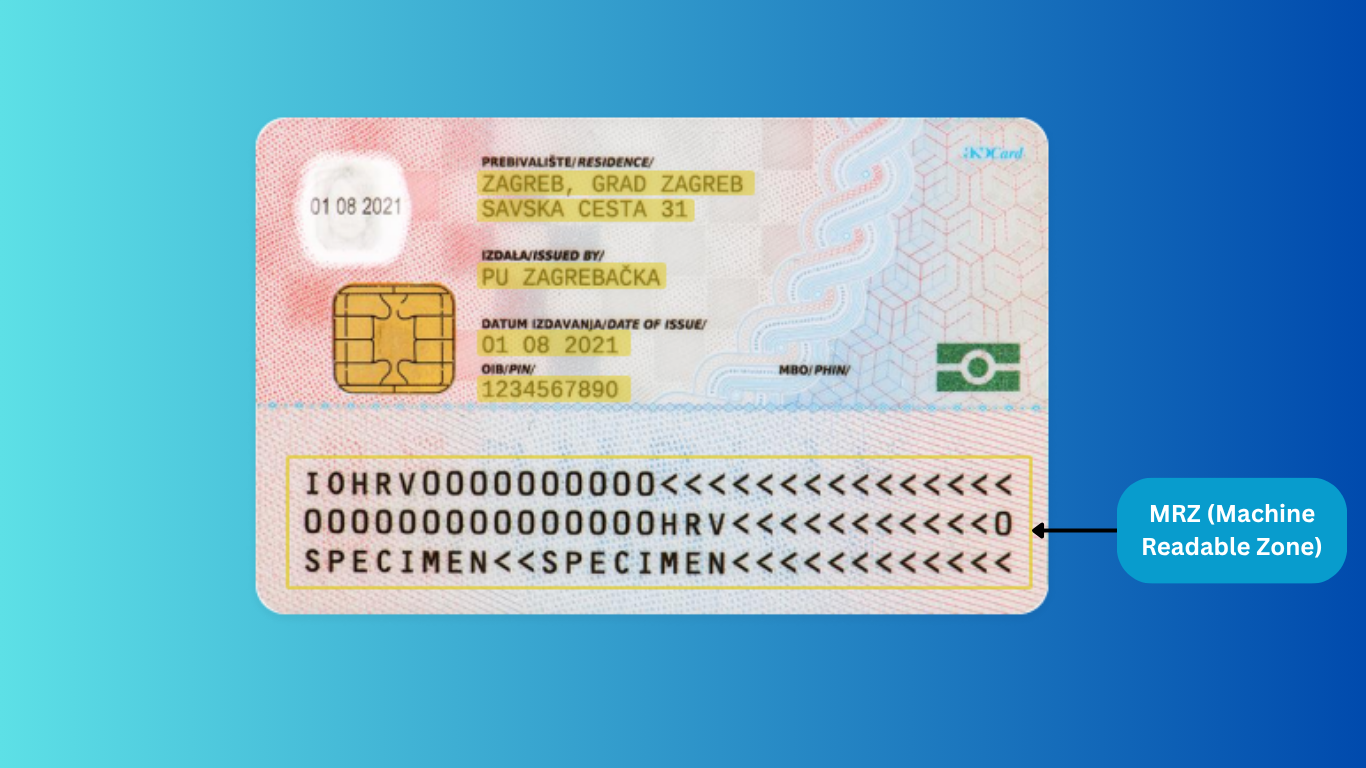
The MRZ appears as two or three lines of text at the bottom of the document, consisting of uppercase letters, numbers, and the filler character “<“. To the human eye it looks like noise. To a machine, it is a precisely structured data field.
The ICAO standardises three MRZ formats, defined in Document 9303, which all 193 member states adhere to:
Type 1 is used for credit card-sized documents such as national ID cards and driving licences. It consists of three lines, each with 30 characters.
Type 2 is rare and used for some travel documents that fall between the size of an ID card and a passport booklet. It has two lines of 30 characters each.
Type 3 is used for standard passport booklets. It features two lines, each with 44 characters — the format most people encounter when travelling internationally.
This standardisation is what makes MRZ so powerful. Because every compliant document uses the same format, OCR systems can be trained to extract the right data fields every time, regardless of which country issued the document or what language it is written in.
How Machines Read the MRZ
The process of reading an MRZ happens in three steps, and modern technology has made each of them nearly instantaneous.
Step one: scanning. The document is presented to a camera or scanner — this could be a passport reader at an airport, a smartphone camera during a remote onboarding process, or a dedicated document scanner at a bank branch. The optical sensor captures an image of the MRZ.
Step two: extraction. OCR technology processes the image and extracts the structured data fields from the MRZ — name, document number, date of birth, expiry date, nationality, and so on. Because the format is standardised, the system knows exactly where each field sits within the character string.
Step three: validation. The system calculates checksums using the check digits embedded in the MRZ. If the checksum does not match the data, it signals that the document may have been altered or forged. The extracted data is then cross-referenced against relevant databases — watchlists, sanctions lists, criminal records — depending on the use case.
The entire process takes milliseconds. What would take a trained officer several minutes of manual inspection can be completed automatically before a caller has finished speaking or a user has moved to the next step of an onboarding form.
Why Check Digits Matter
The check digit system is one of the most underappreciated aspects of MRZ security. Each key data field in the MRZ — the document number, the date of birth, the expiry date, and the full MRZ line — has its own associated check digit. This digit is calculated from the characters in the preceding field using a specific algorithm.
When a machine reads the MRZ, it recalculates the expected check digit from the data it has extracted and compares it to the check digit printed in the document. If they match, the data is intact. If they do not match — even by a single character — the system flags the document as potentially fraudulent.
This makes the MRZ extremely difficult to forge convincingly. Changing a date of birth, altering a document number, or modifying a name would require recalculating every affected check digit correctly. A single error anywhere in the string is enough to trigger a mismatch.
Where MRZ Technology Is Used Today
MRZ was originally developed for the aviation industry, but its applications have expanded dramatically alongside the proliferation of smartphones, cameras, and digital onboarding processes. Today it is used across a wide range of sectors.
Travel and border control remains the most visible use case. Passport readers at airports and land border crossings scan MRZ data in real time to verify identity, check expiry dates, and cross-reference against watchlists and no-fly databases. The speed and accuracy of MRZ scanning is what allows modern airports to process thousands of passengers per hour without compromising security.
Banking and financial services rely heavily on MRZ for identity verification during customer onboarding. When a new customer submits their passport or ID card as part of a KYC (Know Your Customer) process, MRZ scanning allows the bank to instantly extract and validate the key data fields, reducing manual processing time and lowering the risk of accepting fraudulent documents.
Healthcare uses MRZ to verify patient identities during registration, prescription processing, and insurance claim submission. Accurate identity verification in healthcare is not just an administrative matter — it directly affects patient safety and billing integrity.
Retail and e-commerce platforms use MRZ for age verification on age-restricted products, as well as for fraud prevention during account creation or high-value transaction authorisation.
Insurance and financial services use MRZ as part of structured data collection processes — allowing agents to intake accurate policyholder information quickly, reducing errors in claims and renewals.
Public services — including municipal offices, permit processing, and benefits administration — use MRZ to verify applicant identity accurately and consistently, regardless of the volume of applications being processed.
MRZ and Fraud Prevention
Beyond speed, one of the most important functions of MRZ is its role in detecting forged or tampered documents. Fraudsters who attempt to alter the personal data on a document — changing a name, adjusting a date of birth, or substituting a photo — face a significant technical challenge: any alteration to the printed data fields must be accompanied by a corresponding change to the check digits. Getting this right requires precise knowledge of the ICAO algorithm. Getting it wrong results in a checksum mismatch that is detected instantly.
Beyond the mathematical checks, OCR systems can also detect font inconsistencies, character spacing anomalies, and degraded print quality that may indicate a document has been altered or reproduced. For compliance teams managing KYC, AML, and fraud prevention obligations, MRZ scanning adds a fast, reliable, and highly automated layer of document verification that significantly reduces the risk of accepting fraudulent identity documents.
How ScanDoc Reads MRZ
ScanDoc is built on the recognition that speed and accuracy in document processing are not a trade-off — they are both achievable, simultaneously, with the right technology.
ScanDoc’s OCR engine scans and processes the Machine Readable Zone instantly, extracting all structured data fields in a single pass. There is no manual data entry, no delay waiting for a human to check the document, and no risk of transcription error. The system handles the full MRZ reading pipeline — image capture, text extraction, checksum validation, and data output — automatically.
This makes ScanDoc directly applicable to any workflow where identity documents need to be processed quickly and accurately. A hotel reception handling check-in queues. A clinic registering patients at the front desk. A financial services company running remote onboarding. A logistics provider verifying driver identity. In every case, the document is scanned, the MRZ is read, and the verified data is passed downstream — in under a second.
ScanDoc supports all three ICAO MRZ types, covering passports, national ID cards, driving licences, and travel documents issued across all major jurisdictions. The system is designed for high-precision recognition across variable image conditions — different lighting, angles, and camera quality — making it practical in real operational environments, not just controlled lab settings.
For organisations that process high volumes of identity documents and cannot afford errors, delays, or compliance gaps, ScanDoc provides the document intelligence layer that makes the difference.
The MRZ in One Sentence
The Machine Readable Zone is a small strip of standardised text that carries everything a machine needs to verify an identity document — instantly, automatically, and reliably.
ScanDoc reads it faster than a human ever could, and with a precision that manual inspection cannot match.
Need high-precision, instant document recognition? Contact ScanDoc to find out more.
FAQ
What is the MRZ on a passport? The MRZ on a passport is the machine-readable zone at the bottom of the photo page, consisting of two lines with 44 characters each. It contains the holder’s name, date of birth, nationality, document number, issuing country, and expiry date, encoded in a standardised format readable by OCR systems.
What is the MRZ on an ID card? The MRZ on a national ID card or driving licence consists of three lines with 30 characters each. It contains the same core information as a passport MRZ and follows the same ICAO-standardised format.
What is the difference between a machine-readable passport and a regular passport? A machine-readable passport contains an MRZ that allows automated systems to extract and verify the holder’s data instantly. A non-machine-readable passport requires manual inspection, which is slower and more prone to error. Non-machine-readable passports have been phased out by the ICAO since 2015.
How does MRZ help prevent fraud? The MRZ includes check digits calculated from the document’s data fields. Any alteration to the document that is not accompanied by a correctly recalculated check digit will produce a mismatch, flagging the document as potentially forged. This makes MRZ a powerful tool in automated fraud detection and document authentication workflows. Televanta is AI Phone Agent.
Interested to see how ScanDoc can supercharge your business?
Request a Demo
Secure your business and build client trust with reliable data extraction and identity verification solutions.
Get a Demo